

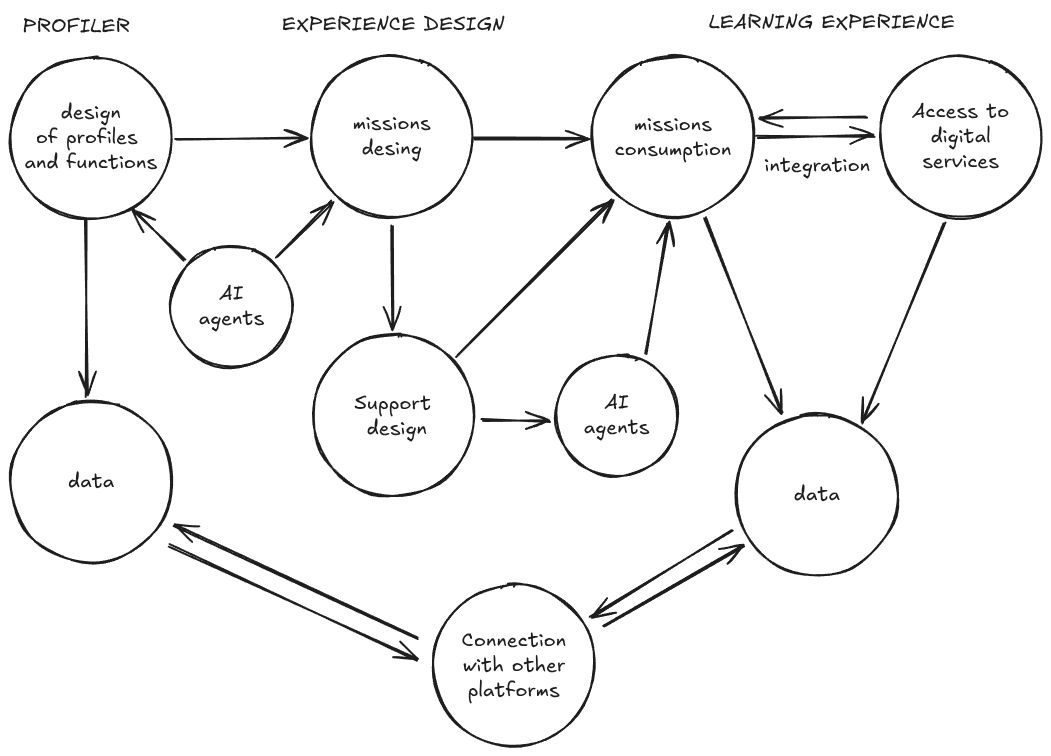
- Profile and function design: Build professional profiles using a hierarchy of functions and competencies.
- Mission design: Create missions (focused on solving a challenge) by personalizing the user experience at each stage through different configurable elements. Includes a series of AI agents to support design.
- AI-powered support: Design and develop intelligent agents that integrate into the learning experience providing guidance, recommendations, and feedback. They can automate the process or augment the mentor’s capabilities.
- Mission experience: Users experience missions directly from the platform and have tools to document their learning and provide evidence.
- Access to digital services: Integration of external digital services (such as GitHub, cloud services, consoles, design apps, or Google Drive, to name a few examples) to offer an experience equivalent to that of a professional context and “datify” user behavior and performance.
- Data intelligence about user behavior and experience, generated from events that occur on the Missions platform and its integrated services.
- Connection with other platforms: Connects with other educational and management systems (LMS, CRM…) through LTI, to ensure an integrated user experience and efficient data management.